If you run a D2C brand and you’re growing fast, you need an eCommerce platform that can actually support scale.
Shopify is great for launching a store quickly, but scaling brings new needs. Things like checkout control, subscription flows, B2B pricing, multi-store management, and total cost become critical for growth.
That’s why we tested Shopify alternatives for our own D2C brand.
These platforms gave us more control, better features for scale, and lower dependency on paid apps.
In this blog, you’ll find the 7 best Shopify alternatives we tested for scaling a real D2C operation.
Each platform on this list is chosen to help you grow with more flexibility, less cost, and fewer limitations than Shopify.
Let’s get started.
7 Best Shopify Alternatives for Scaling a D2C Brand: Quick Summary
- CommercePad – Best for flexible checkout and custom workflows.
- BigCommerce – Great for B2B, wholesale, and multi-store operations.
- WooCommerce – Ideal for content-driven stores that rely on SEO and WordPress.
- Squarespace – Strong choice for design-focused boutique and lifestyle brands.
- Magento / Adobe Commerce – Enterprise platform for deep customization and global scale.
- Wix – Simple all-in-one builder for small, creative storefronts.
- Square Online – Best for retail brands needing POS and online in one system.
Why Should You Look for Shopify Alternatives?
Shopify is great for launching a store fast, but it becomes harder to work with as your brand scales. There are real issues that many merchants report when they grow past basic needs.
Here are the main reasons brands start looking for alternatives:
- Many merchants say Shopify support does not go deep into technical issues, pushes tasks to apps, or takes a long time to resolve problems unless you are on Shopify Plus.
- Some users have seen features or workflows stop working after years, which creates delays, extra work, and lost time without a clear fix or timeline.
- Instead of solving the root problem, support often suggests manual workarounds, which slow down operations and increase labor costs.
- Merchants have shared that changes to limits or conditions are not always communicated upfront, which makes planning harder and adds platform risk.
- Basic features often require multiple paid apps, which raises monthly costs and creates more points of failure for your store.
- Once you invest time, money, and data into Shopify, it becomes costly to move away, which makes every limitation more painful.
If your brand is reaching a stage where support quality, operations, control, or total cost matter, looking at Shopify alternatives can give you more stability and flexibility for the next phase of growth.
How We Evaluated These Shopify Alternatives
To find the most useful Shopify alternatives, we focused on the things that matter most when you’re running and scaling a D2C brand.
Here’s how we evaluated the 7 best Shopify alternatives:
- Flexibility and control to check how much you can customize checkout, catalog, and storefront without heavy dev work.
- Total cost of ownership to understand the real cost across platform fees, apps, payment fees, and development.
- Operations and workflows to see how well inventory, orders, subscriptions, and B2B tasks are handled natively.
- Performance and SEO tools to ensure fast speed, clean URLs, structured content, and good search visibility.
- Support and platform stability to evaluate how issues are handled and how reliable the platform is at scale.
- Platform control and risk to see how much control you have over payments, data, and long-term platform decisions.
Each platform was reviewed based on how well it helps you scale without the cost, limits, and complexity that come with Shopify.
Shopify vs Top Shopify Alternatives: Quick Comparison
| Tool | Ideal For | Pricing Starts | B2B | Multi-Store | Notes |
| Shopify | D2C brands wanting fast setup & apps | $29/mo | Limited (Plus) | Limited (Markets) | Huge app ecosystem, easy to use, but fees + app reliance |
| CommercePad | B2B & B2C brands needing pricing tiers & affiliate systems | $50/mo | Yes | No public info | Built-in B2B pricing & affiliate, smaller ecosystem |
| BigCommerce | Mid-market & enterprise B2B/B2C brands | $39/mo | Yes (B2B Edition) | Yes (native) | No transaction fees, headless friendly |
| WooCommerce | WordPress-based small to medium stores | Free plugin (hosting extra) | Via plugins | Via plugins | Flexible & open-source but plugin management required |
| Squarespace | Creators, service businesses, small shops | $25/mo | No | No | Best templates, simple setup, limited B2B features |
| Magento / Adobe Commerce | Large enterprise ecommerce with dev resources | Custom ($$$) | Yes | Yes | Highly customizable, expensive, developer heavy |
| Wix | Small D2C stores, creators, local shops | ~$17–$27/mo | No | No | Easy drag-and-drop builder, simpler feature set |
| Square Online | Retail + restaurants needing POS + online store | $0/mo + processing fees | No | No | Best for POS + in-person sales, simple ecommerce |
1. CommercePad – Flexible Ecommerce Platform for B2B & B2C Stores
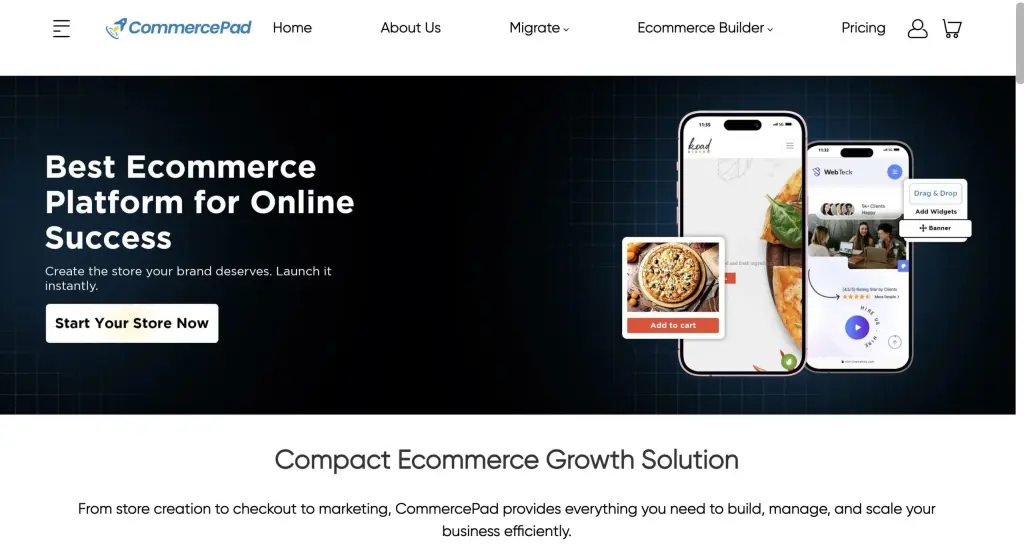
CommercePad is an e-commerce platform that helps you create, manage, and scale online stores.
It supports both B2B and B2C models and includes built-in tools for storefront customization, inventory syncing, wholesale pricing, SEO, and integrations.
Instead of depending on multiple plugins, CommercePad centralizes storefront building, checkout, SEO, and business automation in one system.
Here are the key features of CommercePad:
- You can customize your pages, layouts, and checkout without coding, using a modular builder.
- It has a built-in B2B pricing engine, so you can set volume pricing and tier pricing for wholesalers, resellers, and dealers.
- Inventory and fulfillment update in real time across your sales channels.
- It has built-in affiliate and reseller tools, so you can run multi-level affiliate programs without third-party apps.
- Checkout is fast and mobile-ready, with express payments and real-time shipping rates.
- It connects with payment gateways, shipping companies, ERP, CRM, and marketing tools through plug-and-play integrations.
CommercePad vs Shopify: Quick Comparison
| Feature | Shopify | CommercePad |
| B2B Pricing Engine | Limited (Plus only) | Built-in with granular pricing tiers |
| Affiliate Program | Third-party app | Built-in with L1 & L2 |
| Checkout Customization | Plus only for advanced | Visual controls for customization |
| Customization Limits | Theme-based + apps | Modular + open customization |
| SEO Tools | Apps + native | Built-in organic SEO tools |
Pros & Cons of CommercePad
| Pros | Cons |
| Supports B2B + Wholesale pricing natively | Smaller ecosystem compared to Shopify |
| Built-in affiliate and partner programs | Fewer theme/apps mentioned publicly |
| Modular and scalable system | Learning curve for advanced B2B features |
| Dedicated migration support | Shorter trial period (3 days) |
CommercePad Pricing
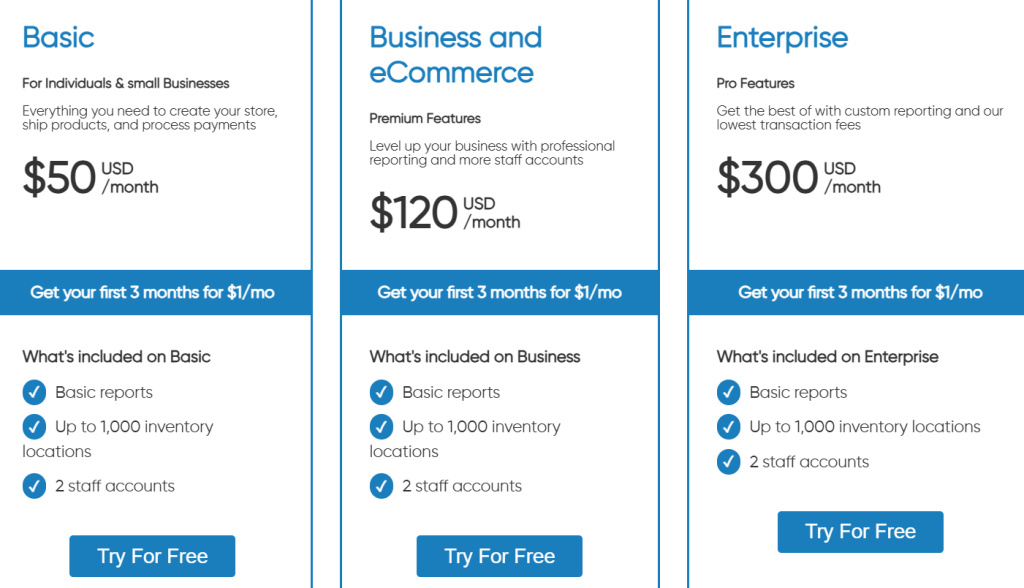
CommercePad uses simple subscription pricing, with plans for different business sizes.
- Basic plan: $50/month, includes basic reports, up to 1,000 inventory locations, and 2 staff accounts.
- Business & eCommerce plan: $120/month, includes basic reports, up to 1,000 inventory locations, and 2 staff accounts..
- Enterprise plan: $300/month, includes custom reporting and the lowest transaction fees.
- Free trial: First 3 months for $1/month on all plans.
Quarterly and yearly billing options are also available for additional savings.
2. BigCommerce – Scalable Open SaaS Platform for B2B & B2C Stores
BigCommerce is an Open SaaS ecommerce platform that helps brands build, customize, and scale online stores.
It supports both B2B and B2C models and includes native tools for headless commerce, multi-storefront, catalog management, B2B price lists, checkout customization, and omnichannel selling.
BigCommerce centralizes storefronts, checkouts, markets, and integrations in one system without forcing merchants into specific payment processors.
Here are the key features of BigCommerce:
- You can customize themes or go headless using CMS/DXPs like WordPress, Contentful, or Next.js.
- It has built-in B2B tools (customer groups, price lists, purchase orders via B2B Edition).
- Multi-storefront lets you run multiple brands, geos, or catalogs from one backend.
- Checkout is optimized and customizable using Checkout SDK and server-to-server APIs.
- It offers multi-currency, multi-language (via apps), and cross-border features for global selling.
BigCommerce vs Shopify: Quick Comparison
| Feature | Shopify | BigCommerce |
| B2B Pricing Engine | Limited to Plus + apps | Built-in via B2B Edition |
| Multi-Storefront | Limited via Markets | Native multi-storefront |
| Checkout Customization | Plus only | Checkout SDK + APIs |
| Transaction Fees | Shopify Payments preferred | 0% platform transaction fees |
| SEO Tools | Apps + native | Native + faceted search |
| Headless Support | Available | Fully supported |
| Payments | Restricted ecosystem | Open payment providers |
Pros & Cons of BigCommerce
| Pros | Cons |
| 0% platform transaction fees | Pricing for Pro scales with revenue thresholds |
| Native multi-storefront & omnichannel | Some B2B tools require B2B Edition |
| Strong B2B + B2C capabilities | Smaller theme ecosystem vs Shopify |
| Enterprise security + uptime (GCP) | Less beginner-friendly for tiny shops |
| No vendor lock-in on payments | Some features tied to specific plans |
BigCommerce Pricing
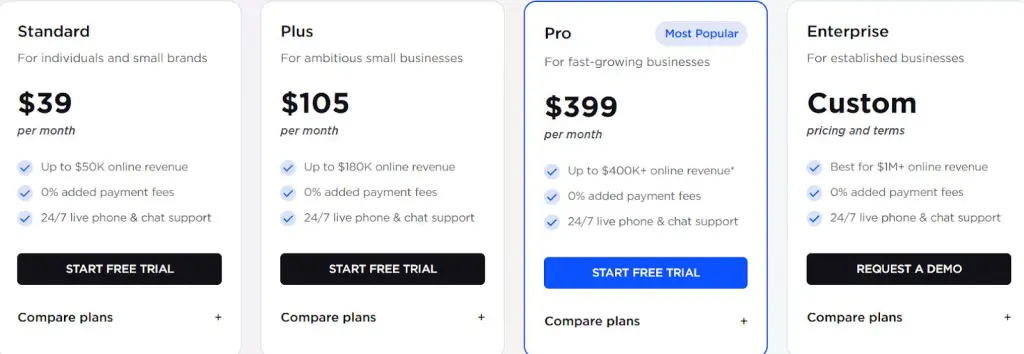
BigCommerce uses plan-based pricing for SMB and custom quotes for Enterprise.
- Standard plan: $39/month, includes unlimited products, single storefront, basic features.
- Plus plan: $105/month, includes stored credit cards, customer groups, and abandoned cart saver.
- Pro plan: $399/month, includes faceted search, Google customer reviews, and higher sales limits.
- Enterprise plan: Custom quote, includes B2B Edition, unlimited staff, API limits, multi-storefront, and priority support.
- Free trial: 15-day free trial (no credit card required).
Quarterly and annual billing discounts are available.
3. WooCommerce – Open-Source Platform Built on WordPress
WooCommerce is an open-source e-commerce platform built on top of WordPress. It lets you build fully customizable online stores with full ownership over your code, data, hosting, and design.
Instead of a closed SaaS system, WooCommerce gives you full control over hosting, features, extensions, and checkout, at a lower long-term cost.
Here are the key features of WooCommerce:
- You can customize any part of your store (pages, checkout, product templates) using themes, plugins, or custom code.
- It integrates with 1,000+ extensions for shipping, payments, taxes, subscriptions, marketing, POS, and more.
- It supports B2B use cases through plugins (customer groups, wholesale pricing, gated catalogs).
- You can choose any hosting provider, CDN, theme, or development stack.
- You fully own your store’s code, data, and infrastructure.
WooCommerce vs Shopify: Quick Comparison
| Feature | Shopify | WooCommerce |
| Hosting | Included | Self-hosted (choose your own hosting) |
| Store Ownership | Shopify controls platform | You own site + data |
| Customization | Theme + apps | Unlimited (open source + extensions) |
| Checkout Editing | Plus needed for advanced edits | Full control via blocks + code |
| Payments | Shopify Payments preferred | Multiple gateways + WooPayments |
| B2B Support | Plus for advanced | Supported via extensions |
| Multi-Channel | Shopify apps | Native + integrations (Google/TikTok/Amazon) |
Pros & Cons of WooCommerce
| Pros | Cons |
| Full ownership of site, code, and data | Requires hosting setup |
| Huge ecosystem (1,000+ extensions & 100+ themes) | Needs developer help for complex builds |
| Supports B2B, subscriptions, headless, enterprise | Extensions can add up in cost |
| No platform fees or payment penalties | Security + maintenance on user |
| Works with WordPress for SEO & blog traffic | Learning curve for beginners |
WooCommerce Pricing
WooCommerce uses a flexible cost model since the software itself is free.
Typical cost components:
- Software: Free (WooCommerce plugin)
- Hosting: ~$10–$35/month (shared/managed WordPress)
- Premium hosting: ~$80–$500+/month (VPS / cloud for high volume)
- Domain: ~$10–$15/year
- Themes: Free to ~$99/year (optional)
- Extensions: Free to ~$199/year each (optional)
- Payment fees: Based on payment gateway (Stripe, PayPal, WooPayments)
There are no platform transaction fees from WooCommerce.
4. Squarespace – All-In-One Website & Commerce Platform for Creators & Small Businesses

Squarespace is an all-in-one platform for building websites, online stores, portfolios, and membership sites.
It includes built-in tools for online selling, scheduling, invoicing, payments, email marketing, domains, and AI-assisted site building.
Unlike platforms that rely heavily on plugins, Squarespace bundles core tools (templates, checkout, analytics, email, bookings, memberships) into one system.
Here are the key features of Squarespace:
- You can build websites using designer templates or the new AI Blueprint Builder without coding.
- It supports e-commerce with product pages, inventory, mobile checkout, shipping, and reviews.
- It includes services & scheduling via Acuity for bookings, classes, and appointments.
- It has invoicing tools for freelancers and agencies to bill clients.
- Squarespace offers memberships & gated content for creators who want recurring revenue.
Squarespace vs Shopify: Quick Comparison
| Feature | Shopify | Squarespace |
| Website Templates | Good | Strong design focus |
| Ecommerce Tools | Advanced | Built-in, simpler |
| B2B Features | Limited via apps | Not focused on B2B |
| Services & Booking | Via apps | Native via Acuity |
| Invoicing | Via apps | Native invoicing |
| Membership Content | Via apps | Native memberships |
| Domains | Third-party or Shopify Domains | Native ICANN registrar |
| AI Site Builder | Limited | Blueprint AI Builder |
| Payment Processor | Shopify Payments preferred | Squarespace Payments |
Pros and Cons of Squarespace
| Depends on the built-in ecosystem vs plugins | Cons |
| Best-in-class templates and design tools | Less flexible for advanced ecommerce |
| All-in-one platform (web + store + bookings + email) | Limited B2B ecommerce features |
| Built-in domains, email campaigns, SEO, analytics | Depends on built-in ecosystem vs plugins |
| Strong for creators, freelancers, service businesses | Not ideal for large SKU catalogs |
| Native scheduling, invoicing, memberships | Depends on the built-in ecosystem vs plugins |
Squarespace Pricing
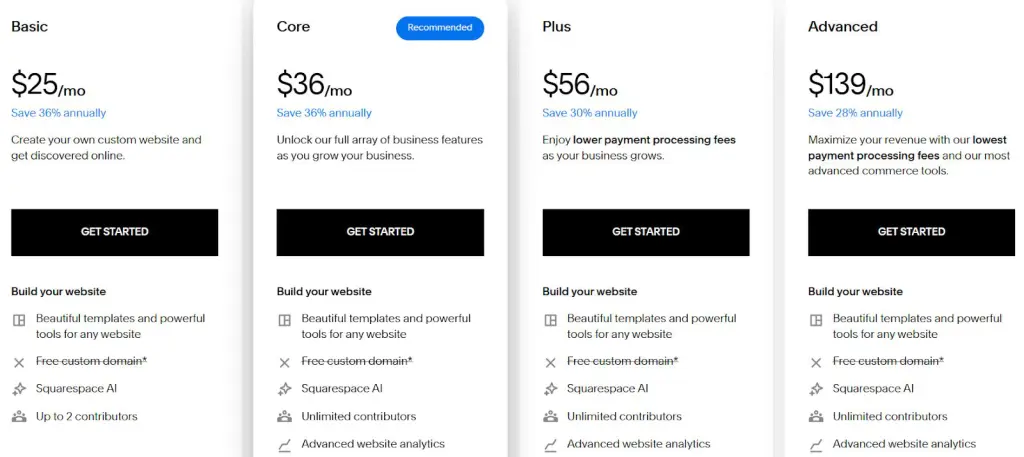
Squarespace uses subscription-based pricing with different plans depending on your needs.
- Basic plan: $25/month, includes website builder, payments, and the ability to sell products and services.
- Core plan: $36/month, includes full business features and ecommerce tools.
- Plus plan: $56/month, includes lower payment processing fees for growing stores.
- Advanced plan: $139/month, includes the lowest processing fees and advanced commerce features.
- Free trial: 14-day free trial (no credit card required).
Annual billing discounts are available on all plans. Squarespace also offers Enterprise plans for large teams with custom requirements.
5. Adobe Commerce – Enterprise Ecommerce Platform for B2B & B2C Brands
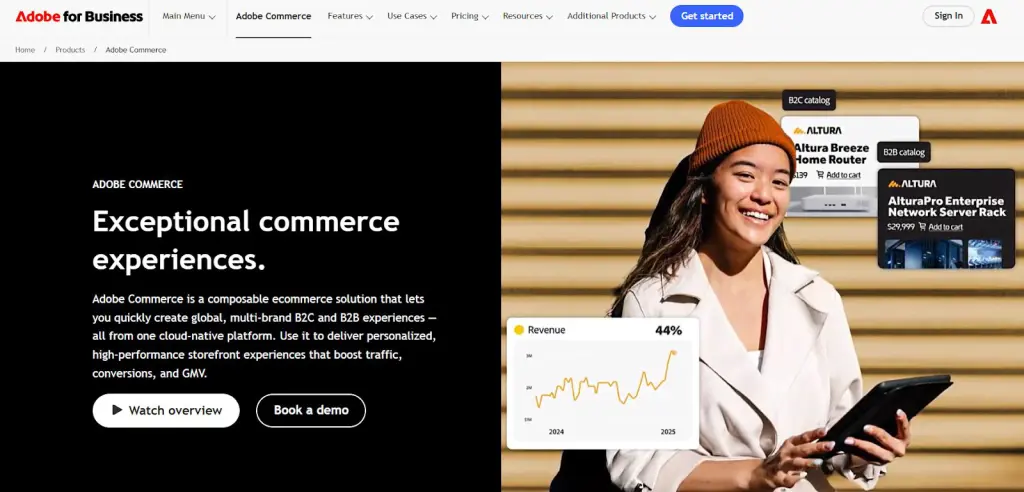
Adobe Commerce is an enterprise e-commerce platform used to build large, complex online stores for both B2B and B2C use cases.
Instead of relying on many plugins, Adobe Commerce centralizes storefront, catalog, checkout, B2B workflows, and integrations in one scalable platform.
Here are the key features of Adobe Commerce:
- You can launch multi-brand, multi-region storefronts from one backend, with shared catalogs and localized content.
- It has built-in B2B tools, so you can enable company accounts, price lists, purchase orders, quotes, and credit limits.
- Checkout is customizable and high-performance, with support for headless builds, APIs, and third-party payment providers.
- It integrates with ERP, CRM, PIM, WMS, and OMS systems, using API connectors, extension marketplace, and integration starter kits.
- Security and compliance are enterprise-grade, with PCI Level 1 certification, WAF, DDoS protection, and continuous vulnerability testing.
Adobe Commerce vs Shopify: Quick Comparison
| Feature | Shopify | Adobe Commerce |
| Multi-Storefront | Limited via Markets | Native multi-site, multi-brand, multi-region |
| B2B Features | Plus only | Built-in (company accounts, quotes, approvals) |
| Personalization | Apps | AI-powered recommendations & search |
| Hosting Options | SaaS only | SaaS + dedicated cloud (PaaS) |
| ERP/CRM Integrations | Apps needed | Enterprise native integrations |
| Catalog Size | Works for most SMB | Handles millions of SKUs |
Pros & Cons of Adobe Commerce
| Pros | Cons |
| Strong enterprise B2B + B2C features | Higher cost vs SMB platforms |
| Native multi-storefront support | Needs technical team or agency |
| Scales for millions of SKUs | Pricing not publicly listed |
| Cloud auto-scaling for peak traffic | Marketplace apps are enterprise-focused |
Adobe Commerce Pricing
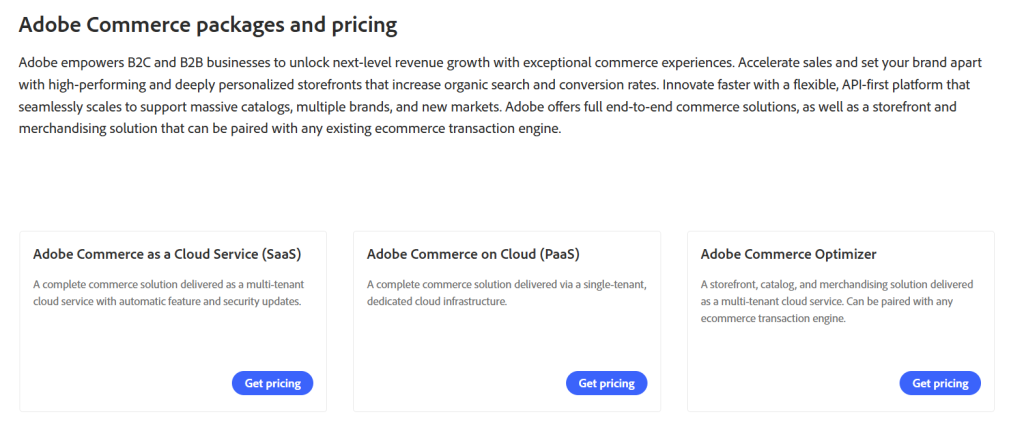
Adobe Commerce uses custom quote pricing based on company size, traffic, and deployment model.
There are three products:
- Adobe Commerce as a Cloud Service (SaaS), a full commerce platform hosted by Adobe
- Adobe Commerce on Cloud (PaaS), single-tenant dedicated environment
- Adobe Commerce Optimizer, storefront + catalog engine (can pair with any backend)
Pricing is not public. You must request a quote from Adobe.
There is no free trial for Adobe Commerce. For smaller users, Magento Open Source is available free (self-hosted).
6. Wix – Easy Website Builder for Small Businesses & Creators
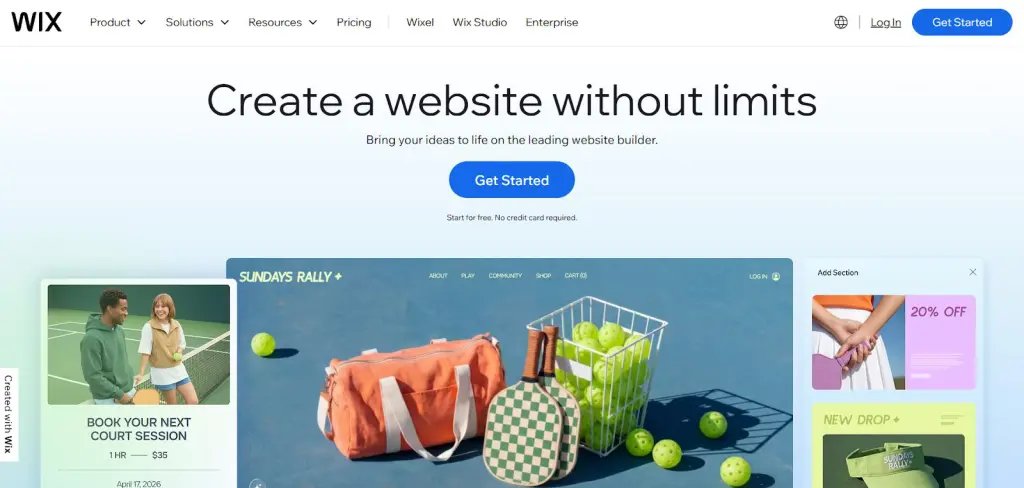
Wix is a popular website builder that helps individuals and small businesses create websites without coding. It offers an AI website builder, 2,000+ templates, eCommerce tools, SEO features, scheduling, payments, and marketing in one platform.
Instead of setting up hosting, design, and plugins separately, Wix bundles web design, hosting, domains, analytics, and business tools in one place.
Here are the key features of Wix:
- You can build websites without coding, using drag-and-drop design tools and customizable templates.
- It has 2,000+ templates, organized by industries like business, portfolio, eCommerce, restaurant, and blog.
- AI tools help with website creation, generating layouts, content, and images based on your inputs.
- Marketing tools are available natively, including SEO setup, social posts, ads, and email marketing.
- Hosting, domains, and security are included, with 99.99% uptime, multi-cloud hosting, and enterprise-grade protection.
Wix vs Shopify: Quick Comparison
| Feature | Shopify | Wix |
| Store Creation | eCommerce-first | Website-first with eCommerce |
| Coding Required | Not required (themes/apps) | Not required (drag-and-drop + AI) |
| Templates | Theme-focused | 2,000+ templates across industries |
| SEO Tools | Native + apps | Built-in SEO tools + AI visibility |
| Payments | Shopify Payments preferred | Multiple payment options |
| Business Tools | Inventory, POS, CRM | CRM, scheduling, bookings, POS, blog |
Pros & Cons of Wix
| Pros | Cons |
| Very easy for beginners | Less flexible for complex online stores |
| AI builder + 2,000+ templates | Advanced SEO takes tuning |
| Includes hosting, domains, security | Design freedom can create messy layouts |
| Built-in scheduling, CRM, and bookings | App ecosystem smaller than Shopify |
| Free plan to start | Includes hosting, domains, and security |
Wix Pricing
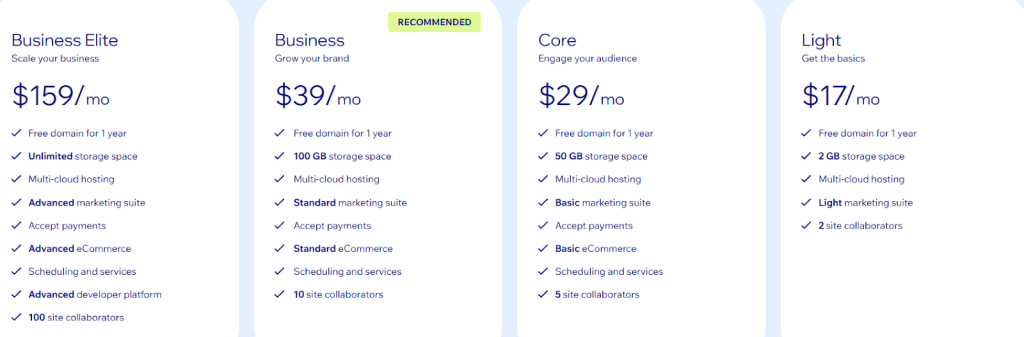
Wix uses plan-based pricing, with yearly billing discounts.
- Light: $17/month (yearly), includes basic website features, 2GB storage, and hosting.
- Core: $29/month (yearly), includes payments, basic eCommerce, scheduling, 50GB storage.
- Business: $39/month (yearly), includes standard eCommerce, marketing tools, 100GB storage.
- Business Elite: $159/month (yearly), includes advanced eCommerce, developer platform, unlimited storage.
- Free plan: Available (Wix branding + no custom domain).
- Domain: Free for 1 year on eligible annual plans.
Pricing does not include taxes and varies by region.
7. Square Online – POS-Connected Ecommerce for Local & Retail Sellers
Square Online is an e-commerce platform that helps you build a free online store, take payments, and sync sales with Square Point of Sale.
Unlike traditional e-commerce builders, Square Online focuses on POS integration, local fulfillment, and omnichannel payments, so you can run online‐to-offline sales in one system.
Here are the key features of Square Online:
- You can connect online and in-person sales, by syncing your online store with Square Point of Sale for unified orders, inventory, and reporting.
- It has real-time inventory tracking, so stock levels stay updated across all locations and sales channels to prevent overselling.
- Customer accounts enhance personalization, allowing shoppers to track orders and receive tailored product recommendations.
- Fulfillment options are flexible, offering shipping, in-store pickup, and local delivery through couriers or your own staff.
- Store themes are customizable without coding, with professionally designed eCommerce templates that speed up storefront setup.
Square Online vs Shopify: Quick Comparison
| Feature | Shopify | Square Online |
| POS Integration | Add-on hardware + apps | Native with Square POS |
| Inventory Sync | Via POS apps | Real-time across POS + online |
| Local Delivery | Apps + third-party | Built-in local delivery options |
| SEO Tools | Native + apps | Built-in + Google integration |
| Customer CRM | Limited without apps | Unified CRM with loyalty & history |
| Best For | Pure ecommerce & DTC brands | Local retail, food, and services |
Pros and Cons of Square Online
| Pros | Cons |
| Free plan to start selling | Limited design vs full CMS builders |
| Native POS & payment syncing | Less flexible for large DTC brands |
| Real-time inventory across locations | Advanced features require Plus/Premium |
| Unified CRM with loyalty, gift cards | Transaction fees apply on sales |
| Local delivery + pickup options | Themes are simpler vs Shopify/Wix |
Square Online Pricing
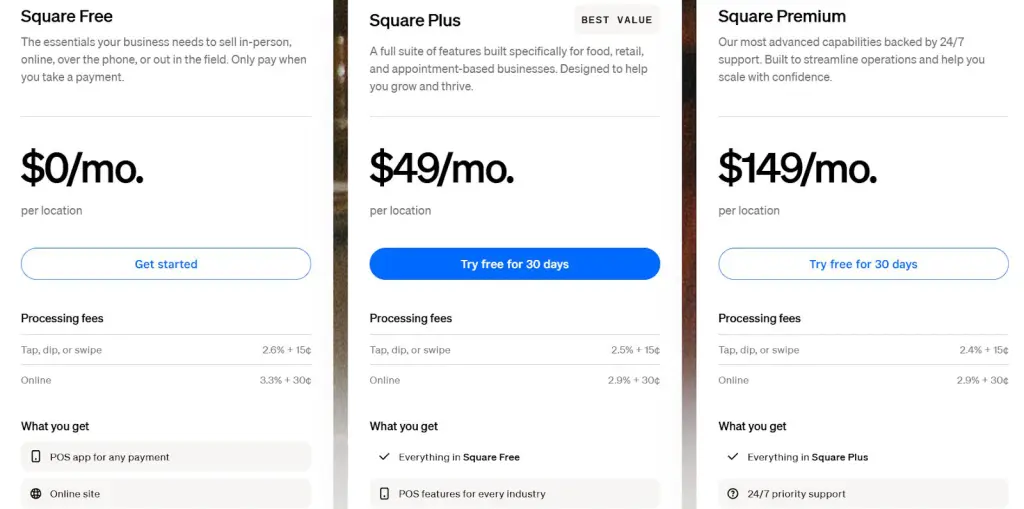
Square uses a location-based pricing model with no contracts. Plans can be upgraded or cancelled anytime.
- Square Free: $0/mo per location, includes website builder, SEO tools, shipping/pickup/delivery, and selling on search & social.
- Square Plus: $49/mo per location, adds expanded customization, advanced item settings, QR ordering, and subscriptions.
- Square Premium: $149/mo per location, includes real-time shipping rates, advanced reporting, and 24/7 support.
- Square Pro: Custom pricing, available for businesses processing $250K+/yr, with custom fees and onboarding.
Processing Fees (Online):
- Free: 3.3% + $0.30
- Plus/Premium: 2.9% + $0.30
A 30-day free trial is offered for Plus & Premium.
Which Shopify Alternative Should You Choose?
If you’re just starting out and want an all-in-one platform, Wix or Squarespace make website building easy without needing any code.
If you already have a WordPress site or want more customization, WooCommerce is a solid pick, especially if you’re already familiar with the WordPress ecosystem.
But if you’re running a growing eCommerce business and want full control, without relying on plugins or patching together tools, then CommercePad is the best choice.
It gives you:
- Built-in B2B pricing
- Multi-level affiliate tools
- Real-time inventory sync
- Fast checkout and plug-and-play integrations
CommercePad is built to handle eCommerce without the complexity of Shopify’s apps or extra fees.
Check out CommercePad and start scaling your store smarter.
Frequently Asked Questions
1. Why do people look for Shopify alternatives?
Shopify can get expensive with apps, limits B2B features, and advanced checkout customization requires Shopify Plus. Some businesses also need more flexibility or lower costs.
2. What is the best Shopify alternative for B2B ecommerce?
For B2B workflows like volume pricing, wholesale catalogs, and reseller tiers, CommercePad is the strongest fit because those features are built in instead of relying on multiple apps.
3. What is the cheapest Shopify alternative?
Tools like Square Online or Wix offer free or lower-cost plans with hosting included, making them more affordable for small sellers.
4. Which Shopify alternative is best for beginners?
Wix and Square Online are beginner-friendly because they include templates, drag-and-drop editing, and hosting in one place.